The hosted platform for MCP Apps

From app to agent.
In minutes.

Metabind turns the components and APIs you already have into a governed agent that answers in your own UI, not a chat window. It takes every customer straight to what they came for. No rewrite. We host it, so there's no server to run. Live in your app and across Claude, ChatGPT, and every MCP host.


Try the Demo


Start Free

Mobile Demo

Desktop Demo

Your customers are already asking AI.

They don't browse. They ask. No menus. No hunting. And today the answer is a paragraph in a chat window. Text where your product should be. Metabind answers each question with your own UI instead.


Your design system.
In the conversation.

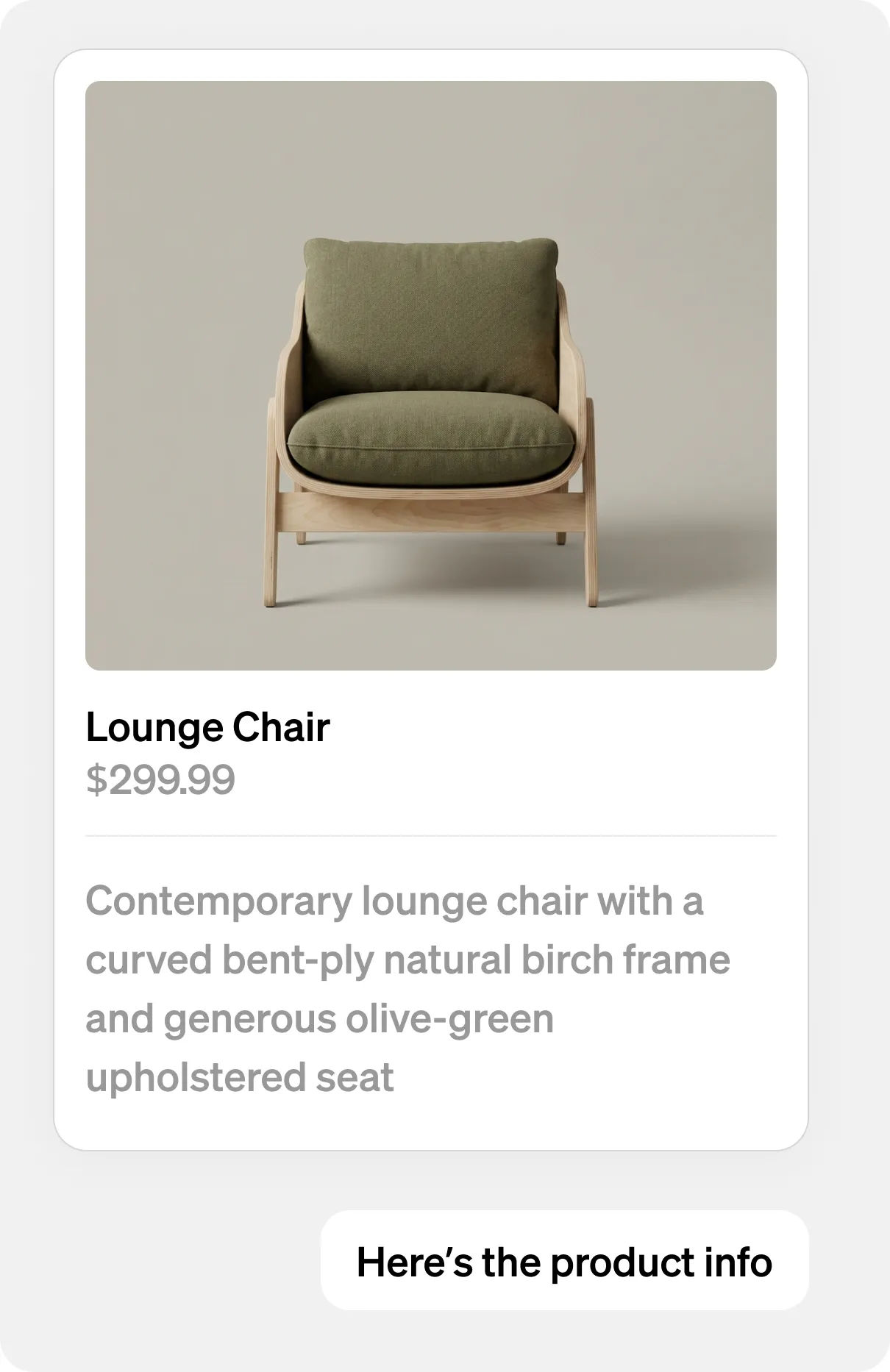
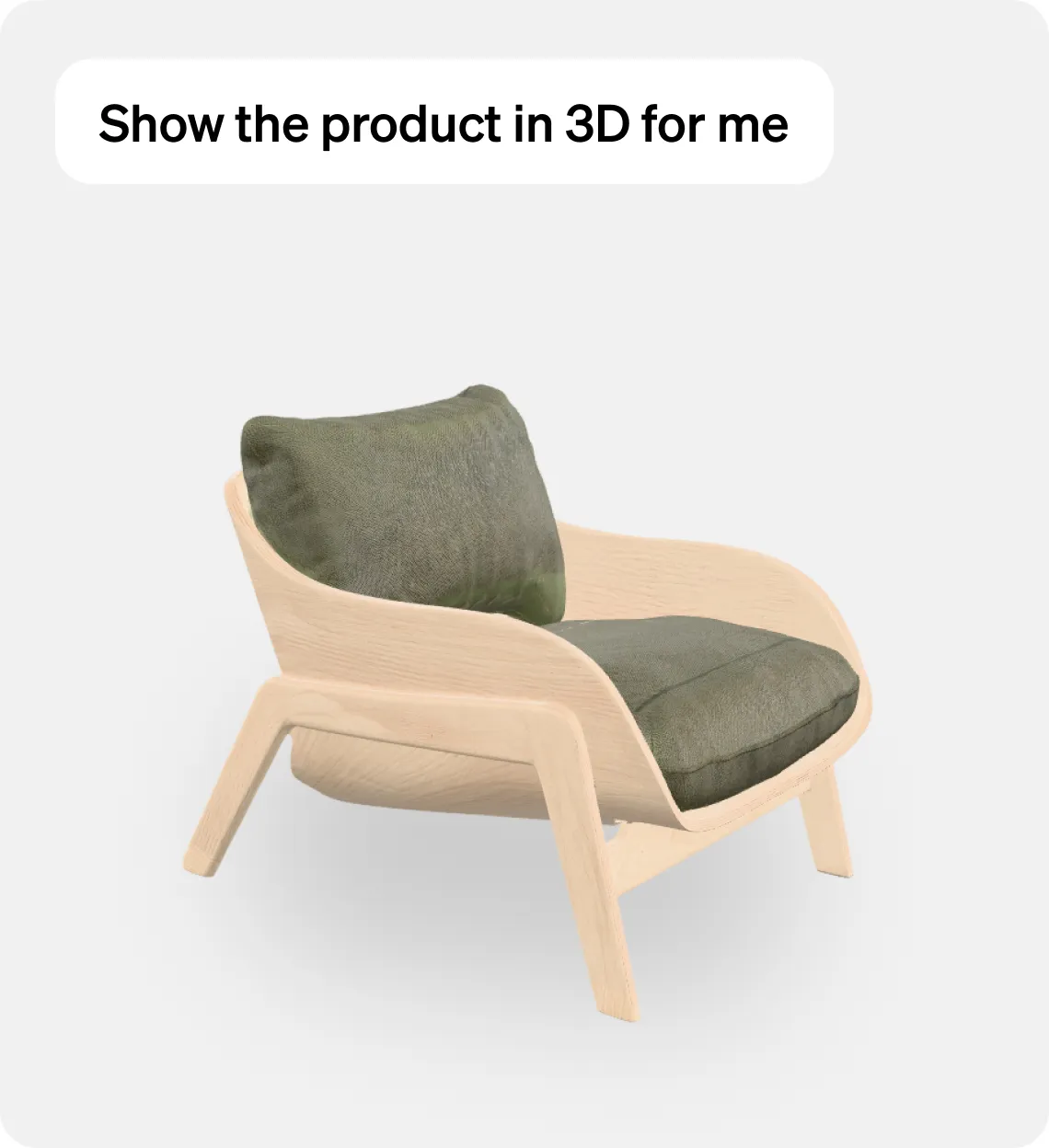
Your agent doesn't type back. It shows you. Product cards, dashboards, galleries, video, 3D, rendered in the conversation as your actual interface, not a wall of text. And it's governed: it can render only components you approved, enforced on every render.

Interactive Tools Docs

Wrap your APIs. Securely.

Your APIs become tools the governed agent can call, wrapped alongside your components. Any REST or GraphQL endpoint, without touching the API itself. Your credentials stay server-side, injected per tool, and never reach the client.

Data Tools Docs


Write once. Native everywhere.

SwiftUI on iOS. Jetpack Compose on Android. React on web. From a single BindJS definition. Real native rendering, not web views. 60 FPS on every platform. BindJS, the language underneath, is open source. Apache 2.0, every renderer and SDK included, so nothing that ships inside your app is closed.

BindJS Docs


Start from a working app.

Retail and finance: two complete apps, each with a governed agent inside, on iOS and Android. Pick the one nearest your business and see what yours becomes. Clone it, point it at your APIs, and run the whole agent inside your own app.

Retail

Finance

Retail Demo

An interior design assistant for a home furnishings catalog. Product carousels, side-by-side comparisons, color palettes and generated room inspiration all come back as rendered components, so the conversation stays visual instead of collapsing into a wall of text.

View and Clone


MCP App Studio. Build it, then talk to it.

Build components visually or in code, configure your tools, and write the script your governed agent follows. Then open the Playground and talk to the agent you just built. Change something, ask again, no deploy in between.

MCP App Studio Docs

Playground

Tools

Components

Assets


You define the tools. We run the server.

A governed agent in production is mostly infrastructure that isn't your product. That part is ours: press publish and Metabind generates an MCP server from your tools, hosts it, scales it, and monitors it. Built on the open Model Context Protocol (SEP-1724) and the MCP Apps extension (SEP-1865), so it runs in any MCP host.

Nothing to provision

No transport code, no host conformance, no deploy pipeline. Serverless, auto-scaling, edge-cached, no cold start.

Versioning and rollback

Every publish is an immutable, versioned package. Promoting it is a metadata flip, not a deployment. Bad render in production? One button back.

Evaluation and observability

Every tool call traced, across every host. Langfuse integration on all paid plans, so you can evaluate and tune your agent on real conversations instead of guessing.


Assistant SDK. Your agent, inside your own app.

Drop-in embed for iOS, Android, and web. Your governed agent runs inside your own app, with the same tools, the same script, and your brand. And the same agent runs across Claude, ChatGPT, and every MCP host, on the open MCP standard. One publish, every surface.

Assistant SDK Docs


Three steps from the app you have to the agent your customers use.

Point Claude Code or Codex at your Metabind workspace and it drives the whole loop from the terminal: convert, wrap, publish. Metabind is hosted, so there's nothing to run locally.

Getting Started Docs

CLI Docs

1

Convert

Claude Code or Codex converts your SwiftUI, Jetpack Compose, or React components, or a Figma file, into BindJS. The Metabind CLI imports them into your workspace and wraps your REST or GraphQL endpoints as tools. Your design system carries over. Only the syntax changes.

2

Playground

Talk to your governed agent before your customers do. The Playground in MCP App Studio runs your tools live, so you can change a component or the script and see the result in the same pass. Preview any component on your phone, real SwiftUI via App Clip, no install, or point the Assistant SDK at your draft endpoint and run the whole agent inside your own app. Your first preview is minutes after signup.

3

Publish

One button. Metabind generates a standards-compliant MCP server, hosts it, and scales it. Your governed agent goes live inside your own app through the Assistant SDK, and across Claude, ChatGPT, and every MCP host.

$


b

r

e

w


i

n

s

t

a

l

l


m

e

t

a

b

i

n

d

a

i

/

t

a

p

/

m

e

t

a

b

i

n

d

$


b

r

e

w


i

n

s

t

a

l

l


m

e

t

a

b

i

n

d

a

i

/

t

a

p

/

m

e

t

a

b

i

n

d


Common Questions

Do I have to rebuild my app?

Is this an MCP App?

What's the free tier?

Can I use my own components?

Do I have to use native mobile?

Can I connect my own APIs?


Make your app think.

No credit card. No sales call. No server to run.


Try the Demo


Start Free

Product

Platform

BindJS Playground

Demo

Resources

Docs

Support

Contact


4962 El Camino Real · Suite 102 · Los Altos CA 94022

The hosted platform for MCP Apps

From app to agent.
In minutes.

Metabind turns the components and APIs you already have into a governed agent that answers in your own UI, not a chat window. It takes every customer straight to what they came for. No rewrite. We host it, so there's no server to run. Live in your app and across Claude, ChatGPT, and every MCP host.


Try the Demo


Start Free

Mobile Demo

Desktop Demo

Your customers are already asking AI.

They don't browse. They ask. No menus. No hunting. And today the answer is a paragraph in a chat window. Text where your product should be. Metabind answers each question with your own UI instead.


Your design system.
In the conversation.

Your agent doesn't type back. It shows you. Product cards, dashboards, galleries, video, 3D, rendered in the conversation as your actual interface, not a wall of text. And it's governed: it can render only components you approved, enforced on every render.

Interactive Tools Docs

Wrap your APIs. Securely.

Your APIs become tools the governed agent can call, wrapped alongside your components. Any REST or GraphQL endpoint, without touching the API itself. Your credentials stay server-side, injected per tool, and never reach the client.

Data Tools Docs


Write once. Native everywhere.

SwiftUI on iOS. Jetpack Compose on Android. React on web. From a single BindJS definition. Real native rendering, not web views. 60 FPS on every platform. BindJS, the language underneath, is open source. Apache 2.0, every renderer and SDK included, so nothing that ships inside your app is closed.

BindJS Docs


Start from a working app.

Retail and finance: two complete apps, each with a governed agent inside, on iOS and Android. Pick the one nearest your business and see what yours becomes. Clone it, point it at your APIs, and run the whole agent inside your own app.

Retail

Finance

Retail Demo

An interior design assistant for a home furnishings catalog. Product carousels, side-by-side comparisons, color palettes and generated room inspiration all come back as rendered components, so the conversation stays visual instead of collapsing into a wall of text.

View and Clone


MCP App Studio. Build it, then talk to it.

Build components visually or in code, configure your tools, and write the script your governed agent follows. Then open the Playground and talk to the agent you just built. Change something, ask again, no deploy in between.

MCP App Studio Docs

Playground

Tools

Components

Assets


You define the tools. We run the server.

A governed agent in production is mostly infrastructure that isn't your product. That part is ours: press publish and Metabind generates an MCP server from your tools, hosts it, scales it, and monitors it. Built on the open Model Context Protocol (SEP-1724) and the MCP Apps extension (SEP-1865), so it runs in any MCP host.

Nothing to provision

No transport code, no host conformance, no deploy pipeline. Serverless, auto-scaling, edge-cached, no cold start.

Versioning and rollback

Every publish is an immutable, versioned package. Promoting it is a metadata flip, not a deployment. Bad render in production? One button back.

Evaluation and observability

Every tool call traced, across every host. Langfuse integration on all paid plans, so you can evaluate and tune your agent on real conversations instead of guessing.


Assistant SDK. Your agent, inside your own app.

Drop-in embed for iOS, Android, and web. Your governed agent runs inside your own app, with the same tools, the same script, and your brand. And the same agent runs across Claude, ChatGPT, and every MCP host, on the open MCP standard. One publish, every surface.

Assistant SDK Docs


Three steps from the app you have to the agent your customers use.

Point Claude Code or Codex at your Metabind workspace and it drives the whole loop from the terminal: convert, wrap, publish. Metabind is hosted, so there's nothing to run locally.

Getting Started Docs

CLI Docs

1

Convert

Claude Code or Codex converts your SwiftUI, Jetpack Compose, or React components, or a Figma file, into BindJS. The Metabind CLI imports them into your workspace and wraps your REST or GraphQL endpoints as tools. Your design system carries over. Only the syntax changes.

2

Playground

Talk to your governed agent before your customers do. The Playground in MCP App Studio runs your tools live, so you can change a component or the script and see the result in the same pass. Preview any component on your phone, real SwiftUI via App Clip, no install, or point the Assistant SDK at your draft endpoint and run the whole agent inside your own app. Your first preview is minutes after signup.

3

Publish

One button. Metabind generates a standards-compliant MCP server, hosts it, and scales it. Your governed agent goes live inside your own app through the Assistant SDK, and across Claude, ChatGPT, and every MCP host.

$


b

r

e

w


i

n

s

t

a

l

l


m

e

t

a

b

i

n

d

a

i

/

t

a

p

/

m

e

t

a

b

i

n

d

$


b

r

e

w


i

n

s

t

a

l

l


m

e

t

a

b

i

n

d

a

i

/

t

a

p

/

m

e

t

a

b

i

n

d


Common Questions

Do I have to rebuild my app?

Is this an MCP App?

What's the free tier?

Can I use my own components?

Do I have to use native mobile?

Can I connect my own APIs?


Make your app think.

No credit card. No sales call. No server to run.


Try the Demo


Start Free

Product

Platform

BindJS Playground

Demo

Resources

Docs

Support

Contact


4962 El Camino Real · Suite 102 · Los Altos CA 94022

The hosted platform for MCP Apps

From app to agent.
In minutes.

Metabind turns the components and APIs you already have into a governed agent that answers in your own UI, not a chat window. It takes every customer straight to what they came for. No rewrite. We host it, so there's no server to run. Live in your app and across Claude, ChatGPT, and every MCP host.


Try the Demo


Start Free

Mobile Demo

Desktop Demo

Your customers are already asking AI.

They don't browse. They ask. No menus. No hunting. And today the answer is a paragraph in a chat window. Text where your product should be. Metabind answers each question with your own UI instead.


Your design system.
In the conversation.

Your agent doesn't type back. It shows you. Product cards, dashboards, galleries, video, 3D, rendered in the conversation as your actual interface, not a wall of text. And it's governed: it can render only components you approved, enforced on every render.

Interactive Tools Docs

Wrap your APIs. Securely.

Your APIs become tools the governed agent can call, wrapped alongside your components. Any REST or GraphQL endpoint, without touching the API itself. Your credentials stay server-side, injected per tool, and never reach the client.

Data Tools Docs


Write once. Native everywhere.

SwiftUI on iOS. Jetpack Compose on Android. React on web. From a single BindJS definition. Real native rendering, not web views. 60 FPS on every platform. BindJS, the language underneath, is open source. Apache 2.0, every renderer and SDK included, so nothing that ships inside your app is closed.

BindJS Docs


Start from a working app.

Retail and finance: two complete apps, each with a governed agent inside, on iOS and Android. Pick the one nearest your business and see what yours becomes. Clone it, point it at your APIs, and run the whole agent inside your own app.

Retail

Finance

Retail Demo

An interior design assistant for a home furnishings catalog. Product carousels, side-by-side comparisons, color palettes and generated room inspiration all come back as rendered components, so the conversation stays visual instead of collapsing into a wall of text.

View and Clone


MCP App Studio. Build it, then talk to it.

Build components visually or in code, configure your tools, and write the script your governed agent follows. Then open the Playground and talk to the agent you just built. Change something, ask again, no deploy in between.

MCP App Studio Docs

Playground

Tools

Components

Assets


You define the tools. We run the server.

A governed agent in production is mostly infrastructure that isn't your product. That part is ours: press publish and Metabind generates an MCP server from your tools, hosts it, scales it, and monitors it. Built on the open Model Context Protocol (SEP-1724) and the MCP Apps extension (SEP-1865), so it runs in any MCP host.

Nothing to provision

No transport code, no host conformance, no deploy pipeline. Serverless, auto-scaling, edge-cached, no cold start.

Versioning and rollback

Every publish is an immutable, versioned package. Promoting it is a metadata flip, not a deployment. Bad render in production? One button back.

Evaluation and observability

Every tool call traced, across every host. Langfuse integration on all paid plans, so you can evaluate and tune your agent on real conversations instead of guessing.


Assistant SDK. Your agent, inside your own app.

Drop-in embed for iOS, Android, and web. Your governed agent runs inside your own app, with the same tools, the same script, and your brand. And the same agent runs across Claude, ChatGPT, and every MCP host, on the open MCP standard. One publish, every surface.

Assistant SDK Docs


Three steps from the app you have to the agent your customers use.

Point Claude Code or Codex at your Metabind workspace and it drives the whole loop from the terminal: convert, wrap, publish. Metabind is hosted, so there's nothing to run locally.

Getting Started Docs

CLI Docs

1

Convert

Claude Code or Codex converts your SwiftUI, Jetpack Compose, or React components, or a Figma file, into BindJS. The Metabind CLI imports them into your workspace and wraps your REST or GraphQL endpoints as tools. Your design system carries over. Only the syntax changes.

2

Playground

Talk to your governed agent before your customers do. The Playground in MCP App Studio runs your tools live, so you can change a component or the script and see the result in the same pass. Preview any component on your phone, real SwiftUI via App Clip, no install, or point the Assistant SDK at your draft endpoint and run the whole agent inside your own app. Your first preview is minutes after signup.

3

Publish

One button. Metabind generates a standards-compliant MCP server, hosts it, and scales it. Your governed agent goes live inside your own app through the Assistant SDK, and across Claude, ChatGPT, and every MCP host.

$


b

r

e

w


i

n

s

t

a

l

l


m

e

t

a

b

i

n

d

a

i

/

t

a

p

/

m

e

t

a

b

i

n

d

$


b

r

e

w


i

n

s

t

a

l

l


m

e

t

a

b

i

n

d

a

i

/

t

a

p

/

m

e

t

a

b

i

n

d


Common Questions

Do I have to rebuild my app?

Is this an MCP App?

What's the free tier?

Can I use my own components?

Do I have to use native mobile?

Can I connect my own APIs?


Make your app think.

No credit card. No sales call. No server to run.


Try the Demo


Start Free

Product

Platform

BindJS Playground

Demo

Resources

Docs

Support

Contact


4962 El Camino Real · Suite 102 · Los Altos CA 94022