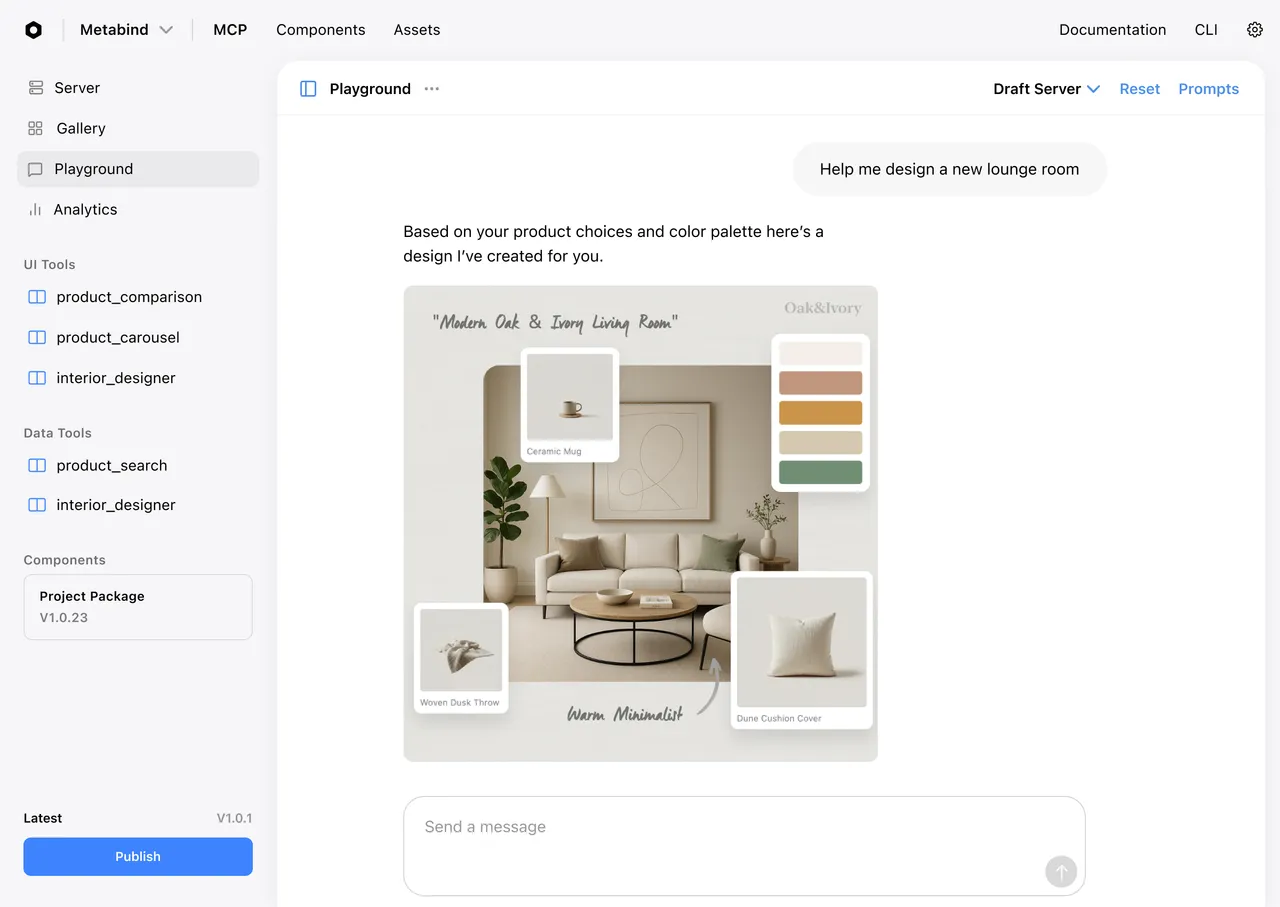
The Agentic Layer for your App.

Metabind turns your APIs and UI components into a governed agent. No rewrite. An agent proxy orchestrates them against the system prompt you author, and one publish reaches Claude, ChatGPT, and every MCP host, plus embeds inside your own app, native on iOS and Android. Your brand and your rules, enforced on every render.

Build it.

Write components, configure tools, and compose content and media.

Native rendering, everywhere.

Every Interactive Tool compiles to React, SwiftUI, and Jetpack Compose from a single BindJS definition. One definition. Three native renderers.

React in the MCP host.

Your Interactive Tool renders as React in Claude, ChatGPT, VS Code, and every MCP Apps host, in a sandboxed iframe. Built on the open MCP standard: SEP-1724 (Model Context Protocol) and SEP-1865 (MCP Apps), so it runs in any MCP-compatible host.

SwiftUI on iOS.

Your BindJS components compile to real SwiftUI. Native gestures, native animations, App Store compliant, 60 FPS.

Jetpack Compose on Android.

The same component definition renders as real Jetpack Compose. Material3 defaults. Native scroll. Native performance.

One build, every surface.

Write once. Render natively on three platforms. Same schema, same validation, same component allowlist on every surface.

BindJS: the component language.

The component language Metabind compiles to native SwiftUI, Jetpack Compose, and React. Declarative. SwiftUI-inspired. Familiar by design.

Designed for cross-platform native.

BindJS was built so a single component definition could render natively on three platforms. Not React on mobile. Not a translation layer. A purpose-built component language, designed end-to-end with the runtimes.

Familiar by design.

Declarative syntax, similar layout model, similar composability patterns. SwiftUI and Jetpack Compose developers find the mental model transfers directly. React developers work at the component pattern and props architecture layer.

Full property and modifier system.

PropertyString, PropertyNumber, PropertyAsset, PropertyComponent, PropertyArray. 40+ chainable modifiers covering layout, transform, styling, text, gestures, animation. Complete reference in the docs.

Cross-platform parity.

Same component definition, identical schema validation, identical component allowlists on every surface. The agent cannot inject anything you didn't approve, on any platform.

MCP App Studio in depth.

The visual development surface for components, tools, and content. Build on a real device. Ship what you tested.

Visual component builder.

Build BindJS components in a code editor with the live preview rendering alongside. Inspector for component properties. Save state, branching, version history.

Live device previews.

Generate a preview link for any component, content, or MCP App. iOS opens as an App Clip, real native SwiftUI on the device, no install. Android opens in the preview app. Web opens in the browser.

Sample apps to clone.

Pre-built MCP Apps you can clone, customize, and publish in minutes.

Draft and production surfaces.

Test on the draft endpoint before publishing. The MCP App Studio preview connects to the draft endpoint by default; production endpoint stays untouched until you publish.

Media pipeline, built in.

Drop photos, videos, and 3D models into MCP App Studio. Every file becomes AI-ready immediately.

Semantic search built in.

Every uploaded file is indexed for semantic search. An auto-registered search tool exposes the whole media library to the AI: no vector database to wire up, no embedding pipeline to maintain.

HLS encoding for video.

Every uploaded video is encoded to HLS at multiple resolutions and delivered via CDN. Native video playback on iOS, Android, and web. No player library required.

3D models, native rendering.

USDZ on iOS, GLB on Android and web. Rotate, zoom, interact. The Assistant SDK handles rendering natively.

CDN delivery.

Every asset served globally with automatic optimization. Image formats, resolution, caching, all handled.


Ship it.

Hosted MCP servers, the Assistant SDK, and draft and production endpoints.

Bring your APIs.

Data Tools wrap what you already have. Point at your existing REST or GraphQL endpoint. Configure auth. Ship.

Auth patterns supported.

API keys, OAuth 2.0, custom headers. Secrets stored encrypted, injected at runtime, never embedded in component code.

Isolation by default.

Data Tool handlers run in V8 sandboxes with execution limits (60 seconds, 128MB) and restricted outbound HTTP. No filesystem access. No cross-tenant exposure.

Typed input and output.

Data Tool schemas are declared up front. The MCP server validates both directions: inputs from the AI, outputs back to the AI. Integration errors surface immediately.

Assistant SDK in depth.

Drop-in embeddable governed agent for your own iOS, Android, or web app.

Conversational UI included.

A single drop-in view is a full conversational interface with inline native rendering of Interactive Tool responses. Drop it into your app; ship a working governed agent.

Use our hosted chat or bring your own.

Use Metabind's proxy mode (no LLM keys in your client), or connect directly to Anthropic, OpenAI, or Google with your own key.

Bi-directional interaction.

User taps a rendered component; the AI gets context. User scrolls a gallery; the AI knows. Conversational iteration with the rendered UI as part of the context.

Auth at the SDK level

SSO login. Audit logging. Session management. Configure once in the project; the SDK handles it.

Draft and production endpoints.

Every project has two MCP server endpoints. Test before you ship.

Production

Serves only published Types. This is what your Claude Desktop, ChatGPT, or Assistant SDK deployment connects to.

Draft

Serves every tool: published, modified, draft. Point a test MCP client at the draft URL, iterate on tool definitions, promote to production when ready.


Run it.

Governance, versioning, analytics, and team workflows, once you're live.

Governance on every render.

Every Interactive Tool response is validated against the tool's JSON schema before anything renders. Component allowlists enforce which components can appear. The agent cannot render what you haven't approved.

Schema validation

Every tool response, every render. Invalid data gets rejected with a typed error. It never reaches the user.

Component allowlists

Lock down which components are allowed in a tool's output. A product-search tool can render product cards but not an admin table. Enforced at render time.

Typed errors, not silent failures

When the agent generates something outside the schema, you see exactly what violated what. Fix it once, it stays fixed.

Packages and versioning.

Immutable, semantic-versioned snapshots of every component in your MCP App. Your published tools render from a specific package version, not whatever's newest. Stage a new version, test it, roll it out. Revert in seconds.

Stage before you ship

New package version lives alongside the production version. Preview it. Test it against real tool calls. Promote when ready.

Instant rollback

A bad render landed in production? Roll back to the previous package version with one button. Every tool that references the package switches over immediately.

Every tool call. Logged.

Every tool invocation is logged with timestamp, input, output, caller, and render outcome. See what's being used, how often, by which hosts: Claude, ChatGPT, VS Code, or your own app via the Assistant SDK.

Usage analytics.

Which tools are called most. Which users call them. Which hosts render which tool types. Daily active MCP Apps, inline renders, Assistant SDK MAU.

Audit trail.

Every tool call, every schema validation result, every rejected render. Exportable. Queryable.

Debug faster.

When a tool misbehaves, you see the exact input, the exact output, and the exact validation path. No guessing.

Team workflows and SSO.

Developers build the component system. Designers maintain the design system. Product managers configure tools. Content editors compose from governed components. Marketing uploads media. The team ships independently of engineering.

Roles and permissions.

RBAC at the organization and project level. Who can edit, who can publish, who can approve. Designers, content editors, product managers, and developers each work in the surfaces meant for them.

SSO

Your team signs in with your identity provider. Configure once at the organization level.

Membership.

Invite by email with role assignment. Revoke access cleanly. Audit who has access to what.

Visual editing for non-developers

Compose from the stock component library, configure properties in the inspector, preview on any device. The developer stays in code; the team ships independently.

Scales with your traffic.

Metabind runs as auto-scaling, multi-tenant infrastructure on AWS. Every MCP App is a tenant boundary; every tool call routes through hosted compute that scales with demand.

Auto-scaling MCP servers.

Tool-call traffic scales horizontally: no provisioning, no capacity planning. Spikes from a feature launch or a viral moment are absorbed by the platform.

Edge-cached component packages.

Every package is content-addressed by immutable hash and pushed to CDN edges globally. Interactive Tool responses render instantly at the user's location: no round trip to load UI, no cold-start on first render.

Tenant isolation by default.

Every Data Tool handler runs in its own V8 sandbox with execution limits (60s / 128MB) and restricted outbound HTTP. No filesystem access. No cross-tenant exposure. Secrets are stored encrypted per tenant and injected at runtime, never accessible across project boundaries.

Global asset delivery.

Photos, videos, and 3D models served from a global CDN with automatic image format negotiation, resolution serving, and caching. HLS-encoded video adapts to viewer bandwidth.

Zero-downtime publishes

Promoting a new tool definition or package version is a metadata flip, not a deployment. Production traffic routes to the new version on the next request: no connection draining, no service interruption.

Rate limiting and quotas.

Per-organization concurrency caps and rate limits protect upstream APIs from runaway tool calls and the platform from abuse. Configurable at the Enterprise tier.


Make your app think.

No credit card. No sales call. No server to manage.


Try the Demo


Start Free

Product

Platform

BindJS Playground

Demo

Resources

Docs

Support

Contact


4962 El Camino Real · Suite 102 · Los Altos CA 94022

The Agentic Layer for your App.

Metabind turns your APIs and UI components into a governed agent. No rewrite. An agent proxy orchestrates them against the system prompt you author, and one publish reaches Claude, ChatGPT, and every MCP host, plus embeds inside your own app, native on iOS and Android. Your brand and your rules, enforced on every render.

Build it.

Write components, configure tools, and compose content and media.

Native rendering, everywhere.

Every Interactive Tool compiles to React, SwiftUI, and Jetpack Compose from a single BindJS definition. One definition. Three native renderers.

React in the MCP host.

Your Interactive Tool renders as React in Claude, ChatGPT, VS Code, and every MCP Apps host, in a sandboxed iframe. Built on the open MCP standard: SEP-1724 (Model Context Protocol) and SEP-1865 (MCP Apps), so it runs in any MCP-compatible host.

SwiftUI on iOS.

Your BindJS components compile to real SwiftUI. Native gestures, native animations, App Store compliant, 60 FPS.

Jetpack Compose on Android.

The same component definition renders as real Jetpack Compose. Material3 defaults. Native scroll. Native performance.

One build, every surface.

Write once. Render natively on three platforms. Same schema, same validation, same component allowlist on every surface.

BindJS: the component language.

The component language Metabind compiles to native SwiftUI, Jetpack Compose, and React. Declarative. SwiftUI-inspired. Familiar by design.

Designed for cross-platform native.

BindJS was built so a single component definition could render natively on three platforms. Not React on mobile. Not a translation layer. A purpose-built component language, designed end-to-end with the runtimes.

Familiar by design.

Declarative syntax, similar layout model, similar composability patterns. SwiftUI and Jetpack Compose developers find the mental model transfers directly. React developers work at the component pattern and props architecture layer.

Full property and modifier system.

PropertyString, PropertyNumber, PropertyAsset, PropertyComponent, PropertyArray. 40+ chainable modifiers covering layout, transform, styling, text, gestures, animation. Complete reference in the docs.

Cross-platform parity.

Same component definition, identical schema validation, identical component allowlists on every surface. The agent cannot inject anything you didn't approve, on any platform.

MCP App Studio in depth.

The visual development surface for components, tools, and content. Build on a real device. Ship what you tested.

Visual component builder.

Build BindJS components in a code editor with the live preview rendering alongside. Inspector for component properties. Save state, branching, version history.

Live device previews.

Generate a preview link for any component, content, or MCP App. iOS opens as an App Clip, real native SwiftUI on the device, no install. Android opens in the preview app. Web opens in the browser.

Sample apps to clone.

Pre-built MCP Apps you can clone, customize, and publish in minutes.

Draft and production surfaces.

Test on the draft endpoint before publishing. The MCP App Studio preview connects to the draft endpoint by default; production endpoint stays untouched until you publish.

Media pipeline, built in.

Drop photos, videos, and 3D models into MCP App Studio. Every file becomes AI-ready immediately.

Semantic search built in.

Every uploaded file is indexed for semantic search. An auto-registered search tool exposes the whole media library to the AI: no vector database to wire up, no embedding pipeline to maintain.

HLS encoding for video.

Every uploaded video is encoded to HLS at multiple resolutions and delivered via CDN. Native video playback on iOS, Android, and web. No player library required.

3D models, native rendering.

USDZ on iOS, GLB on Android and web. Rotate, zoom, interact. The Assistant SDK handles rendering natively.

CDN delivery.

Every asset served globally with automatic optimization. Image formats, resolution, caching, all handled.


Ship it.

Hosted MCP servers, the Assistant SDK, and draft and production endpoints.

Bring your APIs.

Data Tools wrap what you already have. Point at your existing REST or GraphQL endpoint. Configure auth. Ship.

Auth patterns supported.

API keys, OAuth 2.0, custom headers. Secrets stored encrypted, injected at runtime, never embedded in component code.

Isolation by default.

Data Tool handlers run in V8 sandboxes with execution limits (60 seconds, 128MB) and restricted outbound HTTP. No filesystem access. No cross-tenant exposure.

Typed input and output.

Data Tool schemas are declared up front. The MCP server validates both directions: inputs from the AI, outputs back to the AI. Integration errors surface immediately.

Assistant SDK in depth.

Drop-in embeddable governed agent for your own iOS, Android, or web app.

Conversational UI included.

A single drop-in view is a full conversational interface with inline native rendering of Interactive Tool responses. Drop it into your app; ship a working governed agent.

Use our hosted chat or bring your own.

Use Metabind's proxy mode (no LLM keys in your client), or connect directly to Anthropic, OpenAI, or Google with your own key.

Bi-directional interaction.

User taps a rendered component; the AI gets context. User scrolls a gallery; the AI knows. Conversational iteration with the rendered UI as part of the context.

Auth at the SDK level

SSO login. Audit logging. Session management. Configure once in the project; the SDK handles it.

Draft and production endpoints.

Every project has two MCP server endpoints. Test before you ship.

Production

Serves only published Types. This is what your Claude Desktop, ChatGPT, or Assistant SDK deployment connects to.

Draft

Serves every tool: published, modified, draft. Point a test MCP client at the draft URL, iterate on tool definitions, promote to production when ready.


Run it.

Governance, versioning, analytics, and team workflows, once you're live.

Governance on every render.

Every Interactive Tool response is validated against the tool's JSON schema before anything renders. Component allowlists enforce which components can appear. The agent cannot render what you haven't approved.

Schema validation

Every tool response, every render. Invalid data gets rejected with a typed error. It never reaches the user.

Component allowlists

Lock down which components are allowed in a tool's output. A product-search tool can render product cards but not an admin table. Enforced at render time.

Typed errors, not silent failures

When the agent generates something outside the schema, you see exactly what violated what. Fix it once, it stays fixed.

Packages and versioning.

Immutable, semantic-versioned snapshots of every component in your MCP App. Your published tools render from a specific package version, not whatever's newest. Stage a new version, test it, roll it out. Revert in seconds.

Stage before you ship

New package version lives alongside the production version. Preview it. Test it against real tool calls. Promote when ready.

Instant rollback

A bad render landed in production? Roll back to the previous package version with one button. Every tool that references the package switches over immediately.

Every tool call. Logged.

Every tool invocation is logged with timestamp, input, output, caller, and render outcome. See what's being used, how often, by which hosts: Claude, ChatGPT, VS Code, or your own app via the Assistant SDK.

Usage analytics.

Which tools are called most. Which users call them. Which hosts render which tool types. Daily active MCP Apps, inline renders, Assistant SDK MAU.

Audit trail.

Every tool call, every schema validation result, every rejected render. Exportable. Queryable.

Debug faster.

When a tool misbehaves, you see the exact input, the exact output, and the exact validation path. No guessing.

Team workflows and SSO.

Developers build the component system. Designers maintain the design system. Product managers configure tools. Content editors compose from governed components. Marketing uploads media. The team ships independently of engineering.

Roles and permissions.

RBAC at the organization and project level. Who can edit, who can publish, who can approve. Designers, content editors, product managers, and developers each work in the surfaces meant for them.

SSO

Your team signs in with your identity provider. Configure once at the organization level.

Membership.

Invite by email with role assignment. Revoke access cleanly. Audit who has access to what.

Visual editing for non-developers

Compose from the stock component library, configure properties in the inspector, preview on any device. The developer stays in code; the team ships independently.

Scales with your traffic.

Metabind runs as auto-scaling, multi-tenant infrastructure on AWS. Every MCP App is a tenant boundary; every tool call routes through hosted compute that scales with demand.

Auto-scaling MCP servers.

Tool-call traffic scales horizontally: no provisioning, no capacity planning. Spikes from a feature launch or a viral moment are absorbed by the platform.

Edge-cached component packages.

Every package is content-addressed by immutable hash and pushed to CDN edges globally. Interactive Tool responses render instantly at the user's location: no round trip to load UI, no cold-start on first render.

Tenant isolation by default.

Every Data Tool handler runs in its own V8 sandbox with execution limits (60s / 128MB) and restricted outbound HTTP. No filesystem access. No cross-tenant exposure. Secrets are stored encrypted per tenant and injected at runtime, never accessible across project boundaries.

Global asset delivery.

Photos, videos, and 3D models served from a global CDN with automatic image format negotiation, resolution serving, and caching. HLS-encoded video adapts to viewer bandwidth.

Zero-downtime publishes

Promoting a new tool definition or package version is a metadata flip, not a deployment. Production traffic routes to the new version on the next request: no connection draining, no service interruption.

Rate limiting and quotas.

Per-organization concurrency caps and rate limits protect upstream APIs from runaway tool calls and the platform from abuse. Configurable at the Enterprise tier.


Make your app think.

No credit card. No sales call. No server to manage.


Try the Demo


Start Free

Product

Platform

BindJS Playground

Demo

Resources

Docs

Support

Contact


4962 El Camino Real · Suite 102 · Los Altos CA 94022

The Agentic Layer for your App.

Metabind turns your APIs and UI components into a governed agent. No rewrite. An agent proxy orchestrates them against the system prompt you author, and one publish reaches Claude, ChatGPT, and every MCP host, plus embeds inside your own app, native on iOS and Android. Your brand and your rules, enforced on every render.

Build it.

Write components, configure tools, and compose content and media.

Native rendering, everywhere.

Every Interactive Tool compiles to React, SwiftUI, and Jetpack Compose from a single BindJS definition. One definition. Three native renderers.

React in the MCP host.

Your Interactive Tool renders as React in Claude, ChatGPT, VS Code, and every MCP Apps host, in a sandboxed iframe. Built on the open MCP standard: SEP-1724 (Model Context Protocol) and SEP-1865 (MCP Apps), so it runs in any MCP-compatible host.

SwiftUI on iOS.

Your BindJS components compile to real SwiftUI. Native gestures, native animations, App Store compliant, 60 FPS.

Jetpack Compose on Android.

The same component definition renders as real Jetpack Compose. Material3 defaults. Native scroll. Native performance.

One build, every surface.

Write once. Render natively on three platforms. Same schema, same validation, same component allowlist on every surface.

BindJS: the component language.

The component language Metabind compiles to native SwiftUI, Jetpack Compose, and React. Declarative. SwiftUI-inspired. Familiar by design.

Designed for cross-platform native.

BindJS was built so a single component definition could render natively on three platforms. Not React on mobile. Not a translation layer. A purpose-built component language, designed end-to-end with the runtimes.

Familiar by design.

Declarative syntax, similar layout model, similar composability patterns. SwiftUI and Jetpack Compose developers find the mental model transfers directly. React developers work at the component pattern and props architecture layer.

Full property and modifier system.

PropertyString, PropertyNumber, PropertyAsset, PropertyComponent, PropertyArray. 40+ chainable modifiers covering layout, transform, styling, text, gestures, animation. Complete reference in the docs.

Cross-platform parity.

Same component definition, identical schema validation, identical component allowlists on every surface. The agent cannot inject anything you didn't approve, on any platform.

MCP App Studio in depth.

The visual development surface for components, tools, and content. Build on a real device. Ship what you tested.

Visual component builder.

Build BindJS components in a code editor with the live preview rendering alongside. Inspector for component properties. Save state, branching, version history.

Live device previews.

Generate a preview link for any component, content, or MCP App. iOS opens as an App Clip, real native SwiftUI on the device, no install. Android opens in the preview app. Web opens in the browser.

Sample apps to clone.

Pre-built MCP Apps you can clone, customize, and publish in minutes.

Draft and production surfaces.

Test on the draft endpoint before publishing. The MCP App Studio preview connects to the draft endpoint by default; production endpoint stays untouched until you publish.

Media pipeline, built in.

Drop photos, videos, and 3D models into MCP App Studio. Every file becomes AI-ready immediately.

Semantic search built in.

Every uploaded file is indexed for semantic search. An auto-registered search tool exposes the whole media library to the AI: no vector database to wire up, no embedding pipeline to maintain.

HLS encoding for video.

Every uploaded video is encoded to HLS at multiple resolutions and delivered via CDN. Native video playback on iOS, Android, and web. No player library required.

3D models, native rendering.

USDZ on iOS, GLB on Android and web. Rotate, zoom, interact. The Assistant SDK handles rendering natively.

CDN delivery.

Every asset served globally with automatic optimization. Image formats, resolution, caching, all handled.


Ship it.

Hosted MCP servers, the Assistant SDK, and draft and production endpoints.

Bring your APIs.

Data Tools wrap what you already have. Point at your existing REST or GraphQL endpoint. Configure auth. Ship.

Auth patterns supported.

API keys, OAuth 2.0, custom headers. Secrets stored encrypted, injected at runtime, never embedded in component code.

Isolation by default.

Data Tool handlers run in V8 sandboxes with execution limits (60 seconds, 128MB) and restricted outbound HTTP. No filesystem access. No cross-tenant exposure.

Typed input and output.

Data Tool schemas are declared up front. The MCP server validates both directions: inputs from the AI, outputs back to the AI. Integration errors surface immediately.

Assistant SDK in depth.

Drop-in embeddable governed agent for your own iOS, Android, or web app.

Conversational UI included.

A single drop-in view is a full conversational interface with inline native rendering of Interactive Tool responses. Drop it into your app; ship a working governed agent.

Use our hosted chat or bring your own.

Use Metabind's proxy mode (no LLM keys in your client), or connect directly to Anthropic, OpenAI, or Google with your own key.

Bi-directional interaction.

User taps a rendered component; the AI gets context. User scrolls a gallery; the AI knows. Conversational iteration with the rendered UI as part of the context.

Auth at the SDK level

SSO login. Audit logging. Session management. Configure once in the project; the SDK handles it.

Draft and production endpoints.

Every project has two MCP server endpoints. Test before you ship.

Production

Serves only published Types. This is what your Claude Desktop, ChatGPT, or Assistant SDK deployment connects to.

Draft

Serves every tool: published, modified, draft. Point a test MCP client at the draft URL, iterate on tool definitions, promote to production when ready.


Run it.

Governance, versioning, analytics, and team workflows, once you're live.

Governance on every render.

Every Interactive Tool response is validated against the tool's JSON schema before anything renders. Component allowlists enforce which components can appear. The agent cannot render what you haven't approved.

Schema validation

Every tool response, every render. Invalid data gets rejected with a typed error. It never reaches the user.

Component allowlists

Lock down which components are allowed in a tool's output. A product-search tool can render product cards but not an admin table. Enforced at render time.

Typed errors, not silent failures

When the agent generates something outside the schema, you see exactly what violated what. Fix it once, it stays fixed.

Packages and versioning.

Immutable, semantic-versioned snapshots of every component in your MCP App. Your published tools render from a specific package version, not whatever's newest. Stage a new version, test it, roll it out. Revert in seconds.

Stage before you ship

New package version lives alongside the production version. Preview it. Test it against real tool calls. Promote when ready.

Instant rollback

A bad render landed in production? Roll back to the previous package version with one button. Every tool that references the package switches over immediately.

Every tool call. Logged.

Every tool invocation is logged with timestamp, input, output, caller, and render outcome. See what's being used, how often, by which hosts: Claude, ChatGPT, VS Code, or your own app via the Assistant SDK.

Usage analytics.

Which tools are called most. Which users call them. Which hosts render which tool types. Daily active MCP Apps, inline renders, Assistant SDK MAU.

Audit trail.

Every tool call, every schema validation result, every rejected render. Exportable. Queryable.

Debug faster.

When a tool misbehaves, you see the exact input, the exact output, and the exact validation path. No guessing.

Team workflows and SSO.

Developers build the component system. Designers maintain the design system. Product managers configure tools. Content editors compose from governed components. Marketing uploads media. The team ships independently of engineering.

Roles and permissions.

RBAC at the organization and project level. Who can edit, who can publish, who can approve. Designers, content editors, product managers, and developers each work in the surfaces meant for them.

SSO

Your team signs in with your identity provider. Configure once at the organization level.

Membership.

Invite by email with role assignment. Revoke access cleanly. Audit who has access to what.

Visual editing for non-developers

Compose from the stock component library, configure properties in the inspector, preview on any device. The developer stays in code; the team ships independently.

Scales with your traffic.

Metabind runs as auto-scaling, multi-tenant infrastructure on AWS. Every MCP App is a tenant boundary; every tool call routes through hosted compute that scales with demand.

Auto-scaling MCP servers.

Tool-call traffic scales horizontally: no provisioning, no capacity planning. Spikes from a feature launch or a viral moment are absorbed by the platform.

Edge-cached component packages.

Every package is content-addressed by immutable hash and pushed to CDN edges globally. Interactive Tool responses render instantly at the user's location: no round trip to load UI, no cold-start on first render.

Tenant isolation by default.

Every Data Tool handler runs in its own V8 sandbox with execution limits (60s / 128MB) and restricted outbound HTTP. No filesystem access. No cross-tenant exposure. Secrets are stored encrypted per tenant and injected at runtime, never accessible across project boundaries.

Global asset delivery.

Photos, videos, and 3D models served from a global CDN with automatic image format negotiation, resolution serving, and caching. HLS-encoded video adapts to viewer bandwidth.

Zero-downtime publishes

Promoting a new tool definition or package version is a metadata flip, not a deployment. Production traffic routes to the new version on the next request: no connection draining, no service interruption.

Rate limiting and quotas.

Per-organization concurrency caps and rate limits protect upstream APIs from runaway tool calls and the platform from abuse. Configurable at the Enterprise tier.


Make your app think.

No credit card. No sales call. No server to manage.


Try the Demo


Start Free

Product

Platform

BindJS Playground

Demo

Resources

Docs

Support

Contact


4962 El Camino Real · Suite 102 · Los Altos CA 94022